
Integration Services
Your CRM Should Talk to
Everything Else
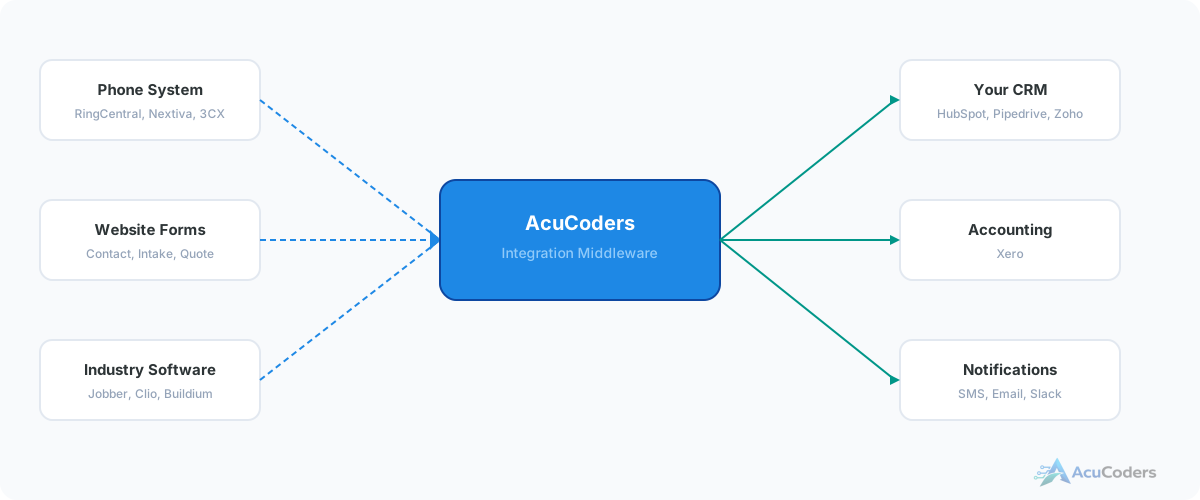
Your CRM has your contacts. Your phone system has your calls. Your accounting has your invoices. We connect them so data flows automatically instead of being copied by hand.
25+ years building softwareAWS Certified Solutions Architect24/7 monitored infrastructure
The Problem
Your CRM Is an Island
Most CRMs do a decent job managing contacts and deals. But they don't know about the call that came in this morning, the invoice that went out last week, or the form submission that happened five minutes ago.
So someone on your team copies data. From the phone system into the CRM. From the CRM into accounting. From the website form into a spreadsheet, then into the CRM. Every manual step is a chance for errors, delays, and lost information.
We connect your CRM to the systems it should already be talking to.
Common CRM integration gaps:
Phone system → CRM
Calls aren't logged. Missed calls don't trigger follow-ups. Voicemails sit unheard.
CRM → Accounting
Closed deals don't create invoices. Payment status isn't reflected in the CRM.
Website forms → CRM
Form submissions go to email. Someone manually enters them. Leads slip through.
Industry software → CRM
Your dispatch, practice management, or property management system doesn't sync with your CRM at all.
What We Connect
CRM Integration Services
We connect your CRM to the tools your business runs on. Here's where we have the deepest experience.
VoIP + CRM Integration
Connect RingCentral, Nextiva, 3CX, or any SIP-based phone system to your CRM. Auto-log calls, route missed calls, transcribe voicemails.
HubSpot Implementation
Set up HubSpot from scratch or connect it to the tools you're already using. Configuration, migration, and integration with your existing stack.
Pipedrive Integration
Connect Pipedrive to your accounting, phone system, marketing tools, and industry software. Custom logic Zapier can't handle.
Xero + CRM Integration
Sync your CRM with Xero so closed deals create invoices, payments update deal status, and your books stay current without manual entry.
RingCentral + HubSpot
Connect RingCentral directly to HubSpot. Log calls, create contacts, trigger workflows based on call outcomes.
RingCentral + Any CRM
Not on HubSpot? We connect RingCentral to Pipedrive, Zoho, Salesforce, or any CRM with an API.
Why Custom
Native Integrations vs Custom
Most CRMs have a marketplace with native integrations. When do you need custom work instead?
Native integrations are fine when:
- You just need basic contact sync between two tools
- The integration exists and does what you need out of the box
- You don't need conditional logic or data transformation
- Both vendors actively maintain the connection
Custom integration is needed when:
- No native integration exists between your tools
- The native integration is too basic — it syncs contacts but not deals, notes, or custom fields
- You need routing logic — lead assignment by territory, source, or value
- You're connecting industry-specific software that's not in any marketplace
- The native integration broke and neither vendor will fix it
The Process
How a CRM Integration Project Works
Discovery
We learn your tools, your data, and your workflows. What needs to flow where, and what logic governs it.
Proposal
Clear scope: what connects, how data flows, what it costs, how long it takes. Fixed price.
Build & Test
We build the integration, test it with real data, and deploy it to our managed infrastructure.
Managed Service
We host, monitor, and maintain it. When something needs updating, you call us and we handle it.
Platforms
CRMs We Work With
If your CRM has an API, we can integrate it. These are the ones we work with most.
HubSpot
Free CRM + paid tiers
Pipedrive
Sales-focused CRM
Zoho CRM
Full suite for SMBs
Others
Any CRM with an API
Industries
CRM Integration by Industry
Every industry has tools that should connect to the CRM but don't.
Legal
Practice management (Clio, Lawcus, PracticePanther) doesn't talk to your CRM. Intake forms, conflict checks, and billing are disconnected.
Field Services
Jobber, ServiceTitan, and Housecall Pro have zero native CRM integrations. Dispatch, scheduling, and customer data live in separate worlds.
Real Estate
Buildium and AppFolio connect to zero CRMs. Property management data, tenant info, and lead routing are all manual.
FAQ
Common Questions About CRM Integration
Still have a question? Call (713) 936-9330 or send us a note.
What CRMs do you integrate with?
We work with HubSpot, Pipedrive, Zoho, and others. If your CRM has an API, we can connect it.
Can you connect my phone system to my CRM?
Yes. We integrate RingCentral, Nextiva, 3CX, and other VoIP systems. Calls log automatically, missed calls trigger follow-ups, voicemails get transcribed.
What about CRM to accounting?
We integrate CRMs with Xero and other accounting platforms. Closed deals create invoices, payments update deal status.
Don't native integrations already handle this?
Sometimes, for basic cases. When you need conditional routing, data transformation, or connections to tools without native integrations, that's where custom work is needed.
How long does a project take?
Simple integrations take 2-3 weeks. More complex multi-system setups with conditional logic take 4-6 weeks.
Setup guides
Doing some of this yourself?
Zoho CRM API Setup for Integrations
How to create a Zoho CRM server-based app, configure OAuth scopes, generate credentials, and avoid common token and data center issues.
Read guide Zoho CRMZoho CRM Webhooks: Setup, Payloads, Limits and Troubleshooting
Configuring Zoho CRM webhooks and workflow rules to send real-time record events to your integration, with payloads, limits and troubleshooting.
Read guideMore in CRM Integration
Related CRM Integration Pages
What's Your CRM Not Connected To?
Tell us what tools you're using. We'll tell you what can be connected and how.