
HubSpot Implementation
Set Up HubSpot Right.
Connect It to Everything.
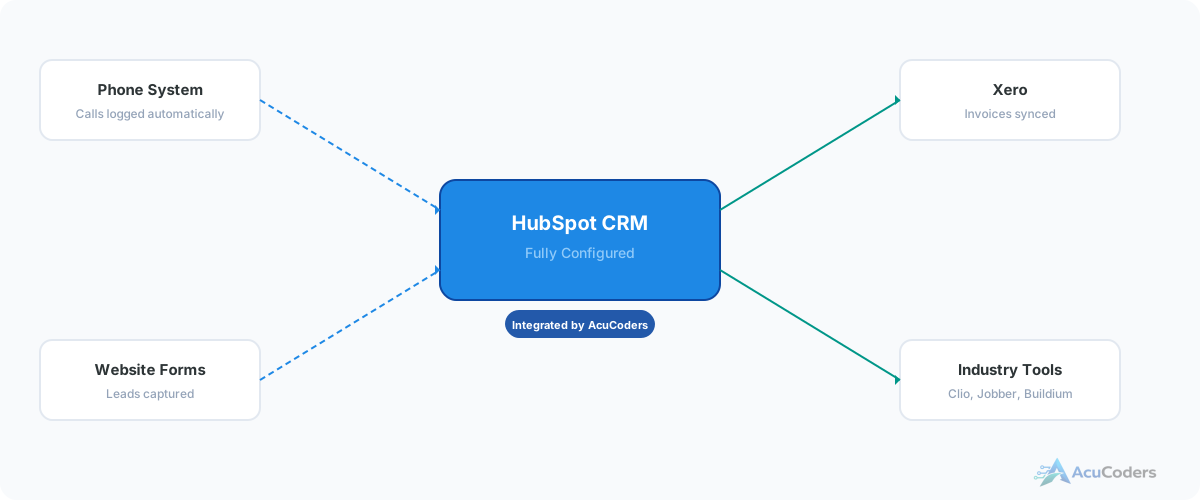
HubSpot implementation isn't just configuring pipelines and importing contacts. It's connecting HubSpot to your phone system, accounting, marketing tools, and industry software so everything works together from day one.
25+ years building softwareAWS Certified Solutions Architect24/7 monitored infrastructure
Who This Is For
Switching to HubSpot or Starting Fresh
You've decided on HubSpot. Maybe you're replacing an old CRM that stopped working for you. Maybe you're a growing business that's been running on spreadsheets. Either way, you need it set up properly and connected to the tools you already use.
Most HubSpot implementation is just setup — pipelines, properties, import your contacts, here are your login credentials. But that leaves your phone system, accounting software, and industry tools disconnected.
We do implementation differently. Setup plus integration. HubSpot configured for your business and connected to everything else from the start.
You're in the right place if:
Migrating from another CRM. You're leaving Salesforce, Pipedrive, Zoho, or something else. Data needs to come over cleanly and integrations need to be rebuilt.
First CRM. You've been running on spreadsheets, email, and memory. Time to centralize — and connect it to your existing tools while you're at it.
HubSpot reset. You have HubSpot but it was set up poorly. Bad data, wrong pipelines, no integrations. Easier to rebuild it properly than to patch it.
Integration-first setup. You know you need HubSpot connected to your phone system, accounting, or industry tools. You want it done as part of implementation, not as an afterthought.
What We Do
Full Implementation, Not Just Setup
Setup and Configuration
Pipelines, deal stages, custom properties, user permissions, email settings, and reporting dashboards — all configured for how your business actually works.
Data Migration
Contacts, companies, deals, notes, and activity history imported from your old CRM or spreadsheets. Deduplicated, cleaned, and mapped to the right properties.
Automation
Workflows for lead assignment, follow-up sequences, deal stage changes, notifications, and task creation. Built around your actual sales process.
Integration
HubSpot connected to your phone system, accounting software, marketing tools, form builders, and industry platforms. Not just set up — wired in.
Training
Your team trained on your specific setup — not generic HubSpot demos. Recorded sessions so new hires can get up to speed without starting over.
Reporting
Dashboards and reports that show what matters — pipeline velocity, rep activity, lead sources, conversion rates. Built during implementation, not bolted on later.
What We Connect HubSpot To
Integration Built Into Implementation
Phone Systems
- RingCentral — call logging, routing, transcription
- Nextiva, 3CX, Dialpad
- Missed call automation and follow-up
Accounting
- Xero — deals to invoices, payments to status
- Contact sync between HubSpot and accounting
- Payment visibility for your sales team
Marketing and Forms
- Website forms to HubSpot contacts and deals
- Email marketing platform sync
- Ad platform conversion tracking
Industry Software
- Project management — won deals create projects
- Field service platforms
- Any platform with an API
The Integration Advantage
We Don't Just Set Up HubSpot — We Connect It
Most HubSpot implementation partners hand you a configured CRM and call it done. But a CRM that isn't connected to your phone system, accounting, and operations tools is just another data silo.
We come from an integration background. When we implement HubSpot, we're thinking about how data flows between every system in your business — not just how HubSpot works in isolation.
The result: your team opens HubSpot and sees call logs, payment status, project updates, and marketing engagement all in one place. That's what implementation should deliver.
What's included in implementation?
Setup, pipeline config, custom properties, data migration, user permissions, automation, reporting, training, and integration with your existing tools.
Can you migrate data from our old CRM?
Yes. Salesforce, Pipedrive, Zoho, spreadsheets, or any system that can export data. Contacts, deals, companies, notes, and activity history all come over.
What tools do you integrate HubSpot with?
Phone systems, Xero, marketing tools, form builders, industry software, and anything with an API. Integration is part of implementation, not a separate project.
Do you provide training?
Yes — training on your specific setup, not generic HubSpot walkthroughs. Recorded sessions so new team members can learn without repeating live training.
How long does implementation take?
2–6 weeks depending on scope. Straightforward setups with a couple integrations go fast. Large migrations and complex automation take longer.
Setup guides
Doing some of this yourself?
Exporting Data from HubSpot
How to export contacts, deals, and companies from HubSpot for migration or audit.
Read guide HubSpotHubSpot API Credentials: Private Apps, OAuth, and API Keys
Which HubSpot API credentials to use now: private app tokens, OAuth 2.0, and what replaced deprecated HubSpot API keys.
Read guide HubSpotHubSpot Custom Properties for Integrations
How to create HubSpot custom contact, deal, and company properties for external IDs, sync status, and integration fields.
Read guide HubSpotHubSpot Private App Setup
Step-by-step instructions for creating a HubSpot private app and generating an access token for integration.
Read guide HubSpotHubSpot Webhooks: Workflow Setup, Payloads, Testing and Troubleshooting
How to set up HubSpot webhooks with workflows and app subscriptions: payloads, authentication, retries, testing and troubleshooting.
Read guideMore in CRM Integration
Related CRM Integration Pages
Ready to Get HubSpot Right?
Tell us what you're using today and what you need HubSpot connected to. We'll map out the implementation.