
Jobber + CRM
Connect Jobber to the CRM
You Actually Use
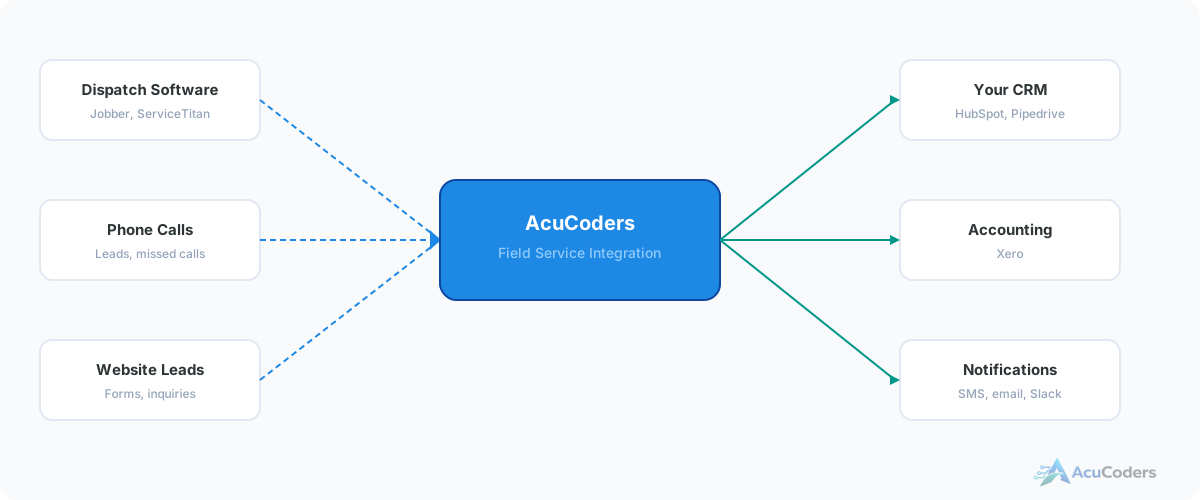
Jobber has zero native CRM integrations. Not HubSpot, not Pipedrive, not Zoho. We connect Jobber to any CRM with an API so your dispatch and sales data stay in sync.
25+ years building softwareAWS Certified Solutions Architect24/7 monitored infrastructure
The Problem
Jobber Thinks It's Your CRM. It's Not.
Jobber has built-in customer records, and for a one-truck operation that might be enough. But the moment you need lead scoring, marketing automation, sales pipeline reporting, or multi-channel attribution, Jobber's contact management falls short.
So you add a CRM. Now you have customer data in two places with no connection between them. Your dispatch team lives in Jobber. Your sales and marketing team lives in the CRM. Neither sees the full picture.
Jobber has a free GraphQL API that exposes everything — customers, jobs, quotes, invoices. Your CRM has an API too. The connection just doesn't exist yet.
Without integration, you're stuck with:
Duplicate data entry
Every customer created in both systems by hand. Every update made twice.
Blind sales team
Your CRM doesn't show job history, service notes, or completed work from Jobber.
Generic marketing
Can't segment by service type or job history because that data is locked in Jobber.
Stale records
Phone numbers updated in one system but not the other. Addresses drift apart over time.
CRM Options
CRMs We Connect to Jobber
If your CRM has an API, we can connect it, including ServiceM8 and other industry systems. These are the ones field service companies ask about most.
HubSpot
Free CRM with marketing automation. Most popular choice for growing field service companies.
Pipedrive
Sales-focused CRM. Clean pipeline view. Good for companies that want simplicity over features.
Zoho CRM
Full business suite. CRM, email, accounting all in one ecosystem. Popular with cost-conscious SMBs.
Salesforce
Enterprise CRM for larger sales teams and multi-site accounts. Common once a service company outgrows simpler tools.
Data Flow
What Syncs Between Jobber and Your CRM
Customer Data
- Name, email, phone, address
- Custom fields from both systems
- Bidirectional updates
Job & Deal Data
- Jobs map to deals in your CRM
- Status changes sync automatically
- Quotes and invoices attached
Activity & Notes
- Service notes on CRM timeline
- Job completion events logged
- Revenue data for reporting
FAQ
Common Questions About Jobber CRM Integration
Still have a question? Call (713) 936-9330 or send us a note.
Does Jobber have any native CRM integrations?
No. Jobber has no native integration with any CRM. It treats customer management as a built-in feature and doesn't connect to external CRMs.
Which CRMs can you connect?
Any CRM with an API. We most commonly connect Jobber to HubSpot, Pipedrive, and Zoho CRM. Industry-specific CRMs work too.
Can Jobber's built-in contacts replace a CRM?
For basic contact storage, yes. For lead scoring, marketing automation, pipeline reporting, or multi-channel attribution, you need a dedicated CRM.
What does Jobber's API support?
Jobber has a free GraphQL API exposing customers, jobs, quotes, invoices, line items, and custom fields. It also supports webhooks.
How does the sync work day-to-day?
It runs automatically on our managed infrastructure. Changes flow between systems in real time or near-real time. No manual steps required.
Setup guides
Doing some of this yourself?
Which CRM Are You Connecting to Jobber?
Tell us what CRM you're using. We'll map out how the data should flow between it and Jobber.