
Jobber + HubSpot
Jobber and HubSpot Don't Talk.
We Fix That.
There's no native integration between Jobber and HubSpot. Both have free APIs. We connect them so your leads, jobs, and customer data sync automatically.
25+ years building softwareAWS Certified Solutions Architect24/7 monitored infrastructure
The Problem
Two Great Tools That Ignore Each Other
Jobber is solid dispatch software. HubSpot is a solid CRM. But Jobber treats customer management as a built-in feature, and HubSpot has no idea your dispatch system exists. Neither company builds a connector between them.
So your office staff copies customer info from HubSpot into Jobber. Or from Jobber into HubSpot. When a job is completed, nobody updates the deal in HubSpot. When a new lead comes in through HubSpot, nobody creates the customer in Jobber until it's time to schedule.
Meanwhile, your marketing team can't segment by job history because that data lives in Jobber, not HubSpot.
What breaks without this integration:
Double data entry
Every customer exists in both systems. Someone has to create them twice and keep both updated.
No job visibility in CRM
HubSpot doesn't know which customers have active jobs, completed jobs, or outstanding quotes.
Blind marketing
You can't send seasonal reminders based on past service history because HubSpot doesn't have it.
Slow lead-to-schedule
New leads sit in HubSpot until someone manually creates a Jobber customer and schedules the job.
What We Build
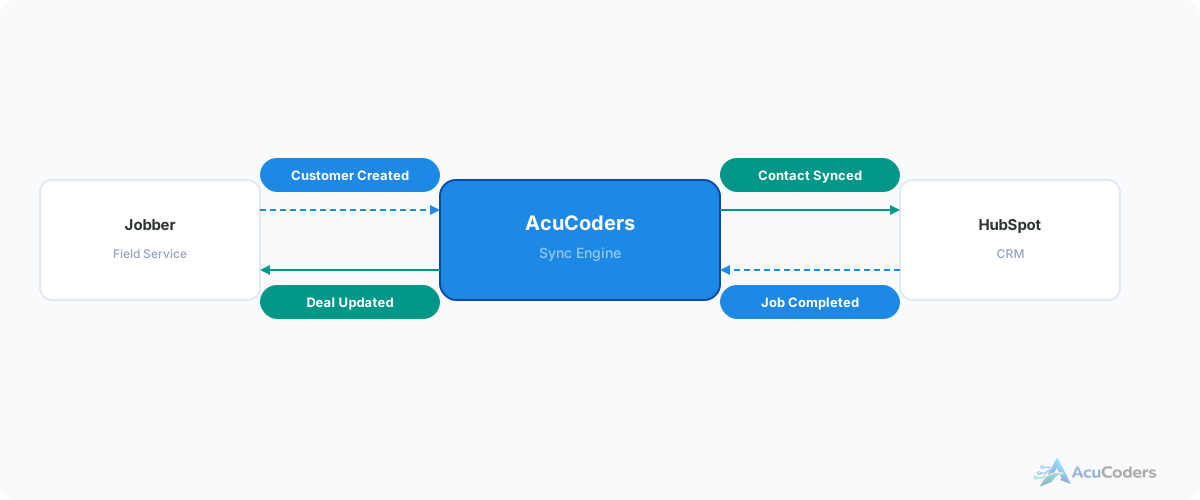
Jobber ↔ HubSpot Data Flow
Jobber has a free GraphQL API. HubSpot has a free REST API. We build middleware that keeps them in sync.
Jobber → HubSpot
- New Jobber customers create HubSpot contacts
- Completed jobs update HubSpot deal stages
- Job notes and service history sync to contact timeline
- Invoice data flows for revenue reporting
HubSpot → Jobber
- New HubSpot leads create Jobber customers
- Deal stage changes trigger Jobber quote creation
- Contact updates sync back to Jobber records
- Marketing source data attached to Jobber customer
Technical Detail
Both APIs Are Free
One of the reasons this integration is straightforward: both platforms provide API access at no additional cost.
Jobber API
- GraphQL API — modern, flexible queries
- Included with any Jobber plan
- Access to customers, jobs, quotes, invoices
- Webhook support for real-time events
HubSpot API
- REST API with comprehensive documentation
- Free CRM tier includes full API access
- Contacts, deals, companies, timeline events
- Webhook subscriptions for real-time updates
The Process
How We Build It
Map Your Data
We learn which Jobber fields map to which HubSpot properties. Customers, jobs, custom fields — all of it.
Build Middleware
We build the connector that talks to both APIs, handles data transformation, and manages sync logic.
Test with Real Data
We run the integration against your actual Jobber and HubSpot data. Verify every field maps correctly.
Deploy & Monitor
We host it on our managed infrastructure. Monitor for errors. Handle updates when either API changes.
FAQ
Common Questions About Jobber + HubSpot Integration
Still have a question? Call (713) 936-9330 or send us a note.
Is there a native Jobber-HubSpot integration?
No. Neither Jobber nor HubSpot builds one. A few third-party connectors and Zapier-style tools cover basic syncing; a custom integration is the way to get reliable two-way sync with your own rules.
What data can sync between them?
Customers, jobs, quotes, invoices, and job status. Completed jobs update deal stages. New leads create Jobber customers.
Does this work with HubSpot Free?
Yes. HubSpot's free CRM includes full API access. Jobber's API is also included with any plan. No paid tier upgrades needed.
What about Zapier?
Zapier's Jobber triggers cover new and updated clients, quotes, jobs and invoices, which is fine for one-way basics. It won't backfill history, match existing records or keep a two-way sync from looping.
How long does it take to build?
A standard Jobber-HubSpot integration takes 2-3 weeks including customer sync, job-to-deal mapping, and bidirectional status updates.
Setup guides
Doing some of this yourself?
Ready to Connect Jobber and HubSpot?
Tell us how you're using both tools today. We'll map out what the integration looks like for your business.