
Legal Intake Automation
Web Form to Open Matter
Without the Manual Steps
A potential client fills out your intake form. The system checks for conflicts, creates the contact and matter, sets up billing, and sends the client portal invitation. Your staff reviews instead of retyping.
25+ years building softwareAWS Certified Solutions Architect24/7 monitored infrastructure
The Problem
Manual Intake Is Slow, Error-Prone, and Drops Leads
A potential client fills out your website form at 4:30 on a Friday. The submission goes to an email inbox. Nobody sees it until Monday. By then, the client has already called three other firms.
Even when someone does see the submission, the process is manual. Type the client info into the practice management system. Run a conflict check. Create the matter. Set up billing. Send the engagement letter. Send portal access. Each step requires opening a different tool and entering data that already exists somewhere else.
It takes 15-30 minutes of admin work per intake. Multiply that by 20-30 intakes a month and you're burning hours on data entry that software should handle.
What manual intake looks like:
Form goes to email
Submission sits in an inbox until someone sees it. Response time depends on who checks email when.
Manual data entry
Someone retypes the client's name, phone, email, and case details into the practice management system.
Conflict check is manual
Someone searches the system for the client name and opposing parties. Easy to miss variations or misspellings.
Steps get skipped
Busy weeks mean conflict checks happen late, billing setup is delayed, and portal invitations are forgotten.
The Pipeline
Automated Intake, Step by Step
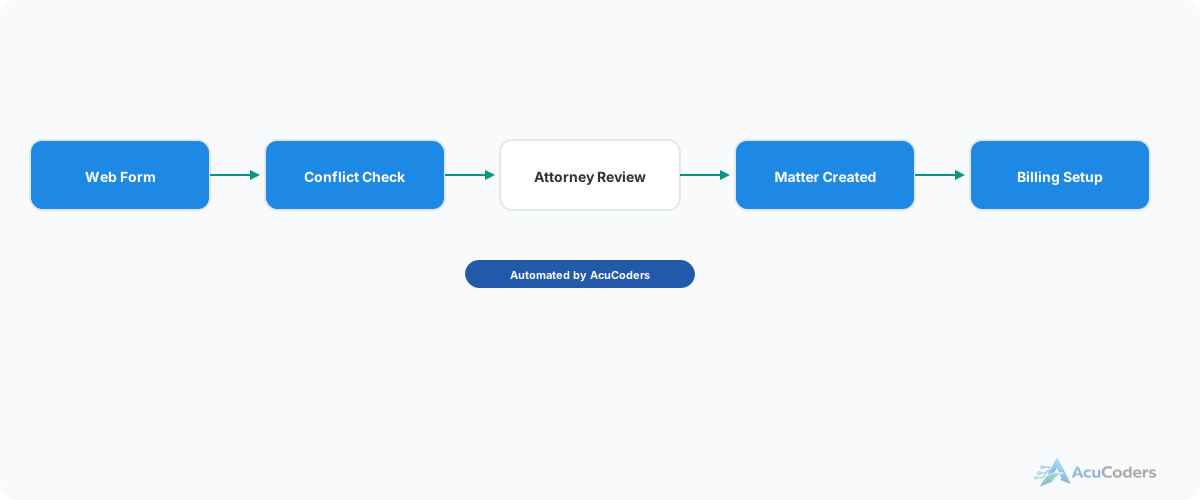
Every step happens automatically. Your staff reviews and approves instead of typing and copying.
Web Form Submission
Potential client fills out your intake form on your website. The form captures client info, case type, opposing parties, referral source, and whatever other fields your process requires.
Automated Conflict Check
The system runs the client name and opposing parties against your entire contact database. Fuzzy matching catches misspellings and name variations. Results include confidence scores and links to related matters. Learn more about conflict checking →
Attorney Review
If conflicts are found, the pipeline pauses and notifies the assigned attorney. They review the matches and either clear the conflict or decline the intake. Everything is logged for your audit trail. If no conflicts, the pipeline continues automatically.
Contact + Matter Creation
Contact is created (or matched to an existing contact) in your practice management system. Matter is created with the correct practice area, assigned attorney, and all intake data populated. No retyping.
Billing Setup
Billing is configured on the new matter based on practice area defaults. Hourly rate, retainer, flat fee — whatever your billing structure requires for that matter type.
Client Portal + Welcome Email
Client gets an invitation to your client portal and a welcome email with next steps. The engagement letter can be queued for e-signature. First impression handled, same day.
Platforms
Works With Your Practice Management Platform
We build intake automation on top of the platform you're already using.
Clio
Full API coverage, webhooks
Lawcus
Developer-friendly API
PracticePanther
REST API available
MyCase
API with intake support
CosmoLex
Built-in accounting sync
Others
Any platform with an API
FAQ
Common Questions About Law Firm Intake Automation
Still have a question? Call (713) 936-9330 or send us a note.
Which practice management platforms does this work with?
We build intake automation for Clio, Lawcus, PracticePanther, and other platforms with APIs. The specific steps vary by platform.
Does this replace our intake staff?
No. It handles the data entry and routing. Your staff still reviews conflict results, makes judgment calls, and handles the human side of intake.
What happens if a conflict is found?
The pipeline pauses and notifies the assigned attorney with match details and confidence scores. The attorney reviews and makes the call. Everything is logged.
Can we customize the intake form fields?
Yes. The form is yours. We connect whatever fields you need — practice area, referral source, opposing party, case description, whatever your process requires.
How long does it take to set up?
Basic intake pipeline takes 2-3 weeks. Full automation with conflict checking, billing setup, and portal invitation takes 4-6 weeks.
How Many Hours Does Your Team Spend on Intake Data Entry?
Tell us about your current intake process. We'll show you what can be automated.