
Legal Integration Services
Your Practice Management Software
Should Talk to Everything Else
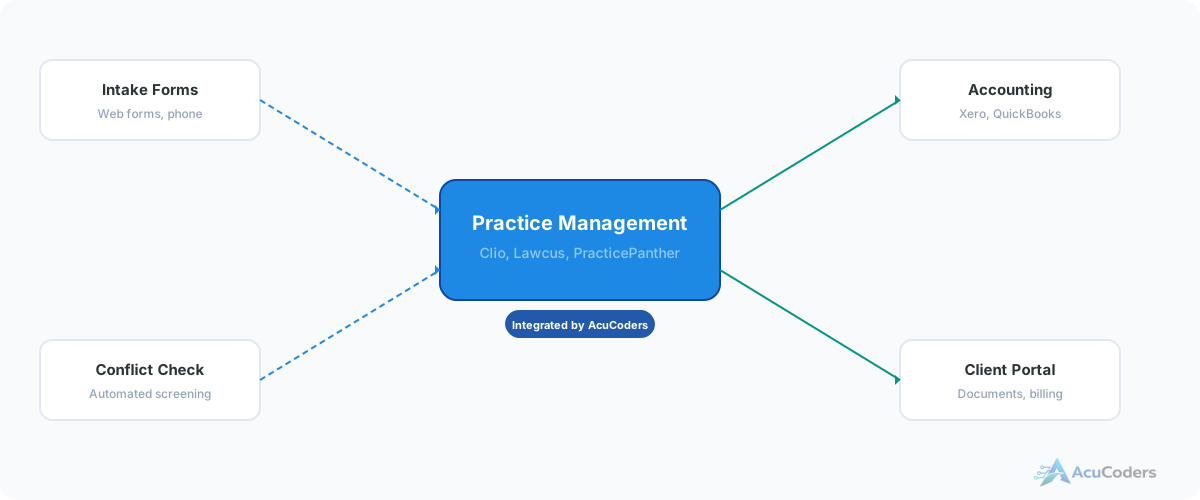
Law firms run on 8+ disconnected tools. Intake forms, practice management, accounting, email, billing, conflict checking, document management, and a client portal. We connect them so data flows instead of being retyped.
25+ years building softwareAWS Certified Solutions Architect24/7 monitored infrastructure
The Problem
Law Firms Run on Disconnected Tools
A new client calls. Someone fills out an intake form. That information gets typed into your practice management system. Then someone checks for conflicts manually. Then the matter gets created. Then someone sets up billing. Then someone sends a welcome email.
Every step is manual. Every step is a chance for errors, delays, or dropped clients. A potential client who fills out your intake form at 4pm on Friday doesn't hear back until Monday because nobody saw the submission.
These tools all have APIs. They can talk to each other. They just need someone to wire them together.
Tools that should be connected but aren't:
Intake forms → Practice management
Form submissions sit in email. Someone manually creates the contact and matter.
Practice management → Accounting
Invoices created in Clio or Lawcus don't sync to QuickBooks or Xero without manual entry.
Practice management → Email
Client communications aren't automatically logged to the matter. Emails get lost in inboxes.
Conflict checking → Intake
Conflicts are checked manually after intake, if they're checked at all. No audit trail.
What We Connect
Legal Practice Management Integrations
We build connections between your practice management platform and the rest of your firm's software.
Intake Automation
Web form to conflict check to matter creation to client portal to billing setup. The full intake pipeline, automated end to end.
Billing + Accounting
Connect your legal billing to QuickBooks or Xero. Invoices, payments, and trust accounting sync automatically.
Conflict Check Automation
Fuzzy name matching, entity matching, confidence scores, and a full audit trail. Integrated into your intake workflow.
Email → Matter Logging
Client emails automatically filed to the correct matter. No more digging through inboxes or forgetting to log communications.
LawPay + QuickBooks
Connect LawPay payment processing to QuickBooks so trust and operating account transactions sync automatically.
Client Portal Sync
New clients automatically get portal access. Documents shared in the portal sync back to the matter in your PM system.
Platforms
Practice Management Platforms We Work With
We integrate with the platforms law firms actually use. If yours has an API, we can connect it.
Clio
Market leader, strong API
Lawcus
Budget-friendly, developer-friendly
PracticePanther
Mid-market option
CosmoLex
Built-in accounting
MyCase
Client-facing features
Others
Any platform with an API
Who This Is For
Built for Small to Mid-Size Law Firms
Solo practitioners to firms with 15 attorneys running budget-friendly practice management platforms.
Solo Practitioners
You're the attorney, the admin, and the IT department. Automation gives you back hours every week by eliminating manual data entry between systems.
Small Firms (2-8 Attorneys)
Big enough to have real workflow complexity but too small for enterprise software. Platforms like Clio, Lawcus, and PracticePanther are the right fit. Custom integration fills the gaps.
Mid-Size Firms (9-15 Attorneys)
Multiple practice areas, more complex conflict checking, higher volume intake. The manual processes that worked at 3 attorneys break down at 10.
FAQ
Common Questions About Legal Practice Management Integration
Still have a question? Call (713) 936-9330 or send us a note.
Which practice management platforms do you integrate with?
We work with Clio, Lawcus, PracticePanther, CosmoLex, and MyCase. If your platform has an API, we can connect it.
Can you connect my practice management to QuickBooks or Xero?
Yes. We build integrations that sync matters, invoices, payments, and trust accounting between your PM platform and your accounting system.
Don't these platforms already have native integrations?
Some do, for basic use cases. Native integrations rarely cover full intake automation, conflict checking with audit trails, or conditional routing between multiple systems.
How long does a practice management integration take?
A single connection takes 2-4 weeks. A full intake-to-billing pipeline with conflict checking takes 4-8 weeks.
Is this only for large firms?
No. Most of our legal clients are solo practitioners to firms with 15 attorneys. Smaller firms on budget platforms benefit the most because those platforms have fewer native integrations.
What's Your Firm Running That Isn't Connected?
Tell us what platforms you're using. We'll tell you what can be connected and how.