
CRM + Accounting Integration
Close the Deal in the CRM.
Invoice in Accounting. Automatically.
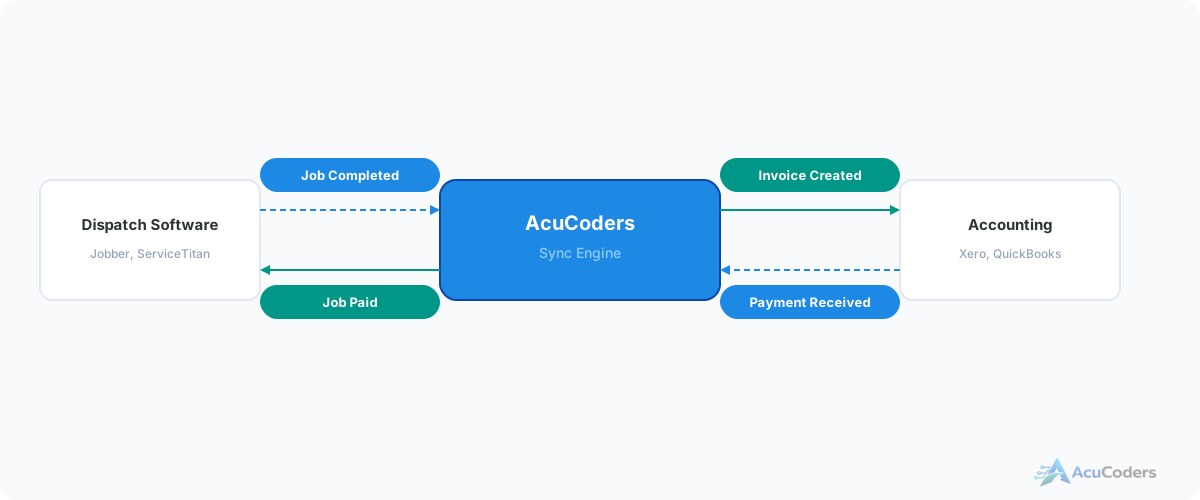
When a deal closes in your CRM, the invoice should appear in Xero. Commission splits should calculate. Payment status should flow back. Right now, someone re-enters all of that by hand.
25+ years building softwareAWS Certified Solutions Architect24/7 monitored infrastructure
The Problem
Two Systems, Zero Connection
Your CRM tracks deals from lead to close. Your accounting system handles invoices, commissions, and payouts. Between the two? Manual data entry.
When a deal closes in the CRM, someone creates an invoice in Xero or QuickBooks. They calculate commission splits based on the deal terms, brokerage fees, and agent agreements. They create the payable entries. Then they update the CRM to reflect what's been paid.
For brokerages handling dozens or hundreds of transactions per month, this manual handoff is a full-time job — and a source of errors that show up as unhappy agents waiting for commission checks.
What gets re-entered manually:
Deal → Invoice
Closed deals in the CRM don't create invoices. Someone manually enters the transaction details in accounting.
Commission splits
Agent splits, team splits, brokerage fees, and referral fees calculated by hand or in a spreadsheet, then entered in accounting.
Payment status
When commissions are paid, the CRM doesn't know. Agents ask the office for status because they can't see it themselves.
Revenue reporting
CRM shows closed deals. Accounting shows revenue. Matching them requires manual reconciliation.
What We Build
CRM-to-Accounting Integration
Automated data flow between your real estate CRM and accounting system. Deals close, invoices create, commissions calculate.
Deal-to-Invoice
When a deal closes in your CRM, an invoice is created in Xero with the correct amounts, parties, and reference details.
Commission Split Calculation
Agent splits, team splits, brokerage fees, and referral fees calculated automatically based on configurable rules.
Payment Status Sync
When invoices are paid in Xero, the CRM updates. Agents see commission status without calling the office.
Agent Payout Management
Commission payables created per agent with correct amounts, tracked in accounting and visible in the CRM.
Rental Income Tracking
For property managers: rent payments, management fees, and owner distributions tracked through the same integration.
Revenue Reconciliation
CRM deal data and accounting revenue always match. No more end-of-month reconciliation headaches.
Platforms
CRMs and Accounting Tools We Connect
Real Estate CRMs
- HubSpot
- Pipedrive
- Zoho CRM
- Any CRM with an API
Accounting
- Xero (deepest experience)
- QuickBooks
- Other accounting platforms with APIs
FAQ
Common Questions About CRM-Accounting Integration
Still have a question? Call (713) 936-9330 or send us a note.
Can you connect my CRM to Xero?
Yes. Closed deals create invoices, commission splits are calculated, and payment status flows back to the CRM.
What about QuickBooks?
We work with both Xero and QuickBooks. The integration logic is similar. Xero is where we have the deepest experience.
How are commission splits handled?
Split rules are configured based on your brokerage's structure. When a deal closes, the correct amounts are calculated and sent to accounting automatically.
Does payment status sync back to the CRM?
Yes. When an invoice is paid in Xero, the CRM updates. Agents can see commission status without checking accounting.
Can this handle rental income too?
Yes. Rent payments, management fees, and owner distributions can all flow through the same integration pattern.
More in Real Estate
Related Real Estate Pages
Stop Re-Entering Deal Data Into Accounting
Tell us your CRM and accounting setup. We'll show you how deals, commissions, and payments can flow automatically.