
Lead Routing Automation
Every Lead to the Right Agent.
Every Time.
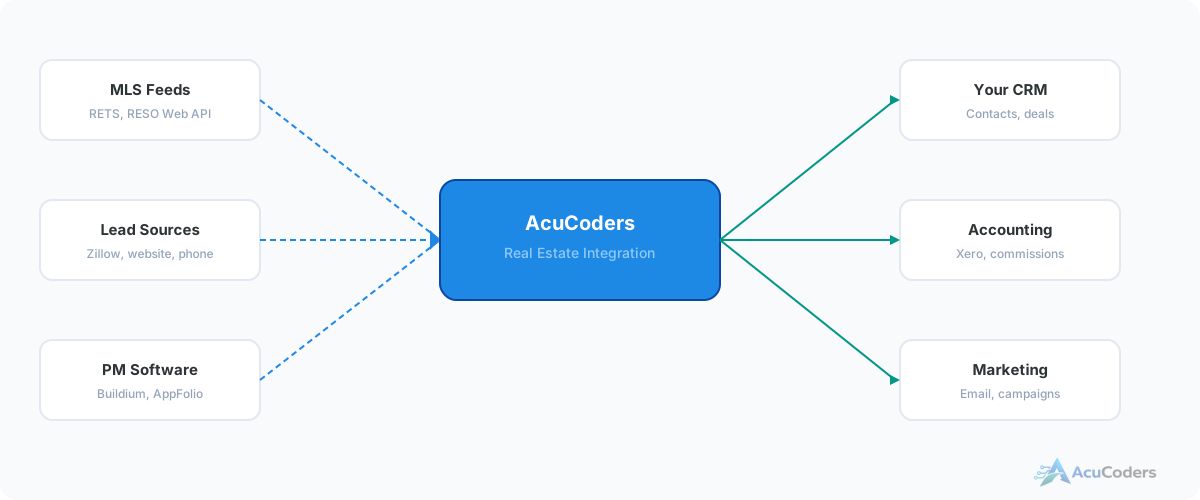
Leads come from Zillow, Realtor.com, your website, and phone calls. They need to reach the right agent based on zip code, price range, property type, and availability — not sit in a shared inbox.
25+ years building softwareAWS Certified Solutions Architect24/7 monitored infrastructure
The Problem
Manual Lead Routing Loses Deals
Real estate leads come from everywhere — Zillow, Realtor.com, your website, phone calls, open houses, referrals. Each source has its own format, its own notification method, and its own timing.
Someone on your team — usually an admin or team lead — manually reads each lead, figures out who should get it, and forwards it. During busy periods, leads sit for hours. Off-hours, they sit until morning. Some get lost entirely.
Speed-to-lead matters in real estate. The first agent to respond wins more often than not. Manual routing is a bottleneck you can't afford.
Where leads fall through:
Slow response times
Manual routing adds minutes or hours before an agent even sees the lead. That delay costs conversions.
Wrong agent assignment
Without rules, leads go to whoever's turn it is — not whoever knows the neighborhood or price range best.
Multiple inboxes
Zillow leads go to email. Website leads go to a form. Phone leads go to voicemail. No single view of incoming leads.
After-hours gaps
Leads that arrive outside business hours sit until someone checks email. Automated routing works 24/7.
How It Works
Automated Lead Routing Logic
We build routing rules that match your team structure and territories. Every lead gets assigned in seconds, not hours.
By Geography
Route by zip code, neighborhood, city, or custom territory boundaries. Each agent gets their area.
By Price Range
High-value leads go to senior agents. First-time buyers go to agents who specialize in that segment.
By Property Type
Commercial, residential, multi-family, land — each type routes to the agent with the right expertise.
By Availability
Agents who are on vacation, at max capacity, or off-hours get skipped. Leads go to someone who can respond now.
Lead Sources
Multi-Source Lead Intake
Every lead source flows into one routing engine. No more checking multiple inboxes.
Website Forms
Contact forms, property inquiry forms, landing pages
Zillow
Zillow lead notifications parsed and routed
Realtor.com
Realtor.com lead notifications parsed and routed
Phone Calls
VoIP integration captures caller info and routes
Email Inquiries
Parsed and assigned based on content and source
API Sources
Any platform that sends lead data via API or webhook
What lead sources can you connect?
Website forms, Zillow, Realtor.com, phone calls, email inquiries, and any platform that provides lead data via API, webhook, or email parsing.
How does routing by zip code work?
Each agent is assigned territories defined by zip codes or regions. Incoming leads are matched to the territory. If that agent is unavailable, fallback rules kick in.
Can you route by price range?
Yes. Leads can be routed by price range, property type, buyer vs seller, or any combination of criteria available in the lead data.
What happens when no agent is available?
You define the fallback: round-robin, escalation to a team lead, or hold with automated acknowledgment until an agent picks up.
Does this replace my CRM?
No. The routing logic sits between your lead sources and your CRM, ensuring every lead is assigned before it enters the pipeline.
More in Real Estate
Related Real Estate Pages
Stop Losing Leads to Slow Routing
Tell us your lead sources and team structure. We'll design routing rules that get every lead to the right agent in seconds.