
RingCentral + Any CRM
Connect RingCentral
to Your CRM
Not every CRM has a RingCentral integration. And the ones that do are usually basic. We connect RingCentral to HubSpot, Pipedrive, Zoho, industry-specific CRMs — with the automation the native apps leave out.
25+ years building softwareAWS Certified Solutions Architect24/7 monitored infrastructure
The Problem
Native Integrations Only Go So Far
RingCentral has native integrations for some CRMs — HubSpot, Salesforce, a few others. They log calls. That's about it.
If your CRM is Pipedrive, Zoho, or an industry-specific platform, there may not be a native integration at all. Your team is manually logging calls or just not logging them.
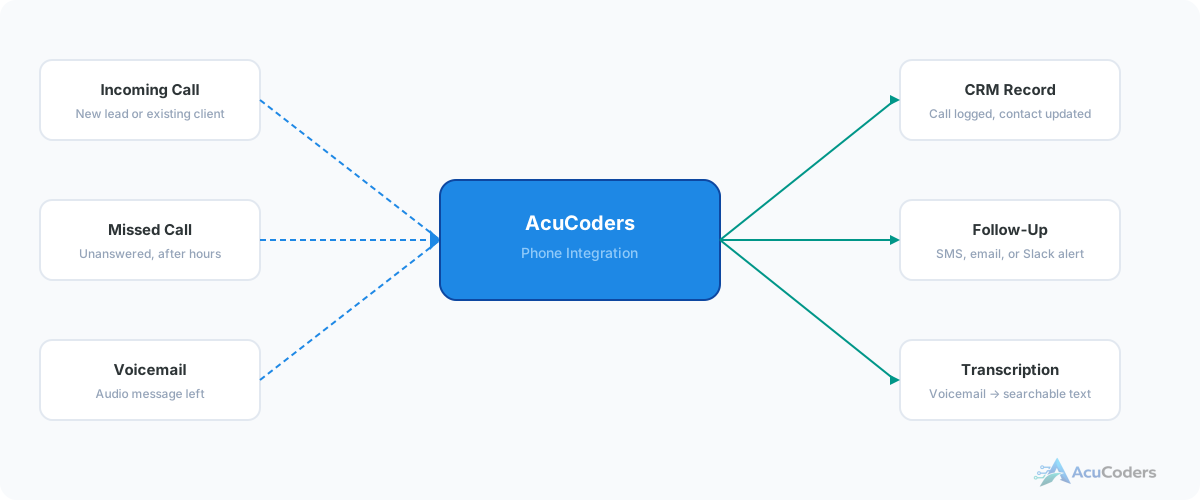
Either way, you're missing automation. Missed calls don't trigger follow-ups. Calls aren't routed based on CRM data. Voicemails aren't transcribed. The phone system and CRM are technically connected but not actually working together.
Two scenarios we see constantly:
No native integration exists. Your CRM doesn't have a RingCentral app. Calls aren't logged at all. Your team copies data by hand — or doesn't.
Native integration exists but is basic. Calls log, but there's no routing logic, no missed call automation, no voicemail transcription, no custom rules.
Industry-specific CRM. You use Clio, Jobber, ServiceTitan, or another vertical CRM. RingCentral doesn't know these platforms exist.
What We Build
Full Call-to-CRM Automation
Automatic Call Logging
Every inbound and outbound call creates a record in your CRM. Caller ID matched to existing contacts. Unknown numbers create new contacts automatically.
Lead Routing
Route calls and new contacts to the right rep based on territory, deal stage, source, or any custom logic. Use CRM data to make routing decisions in real time.
Voicemail Transcription
Voicemails transcribed via AWS Transcribe and attached to the CRM contact record. Searchable text your team can scan in seconds.
Missed Call Follow-Up
Missed calls trigger automatic SMS, email, Slack notifications, or CRM tasks. Configurable per team, per time of day, per contact type.
Call Analytics
Call volume, response times, missed call rates, and follow-up performance — tracked in your CRM where your team already works.
Custom Business Logic
After-hours handling, VIP escalation, spam filtering, call outcome tracking — whatever your business requires, built into the integration.
Which CRMs do you connect to RingCentral?
HubSpot, Pipedrive, Zoho, Salesforce, and industry-specific CRMs like Clio, Jobber, and ServiceTitan. If it has an API, we can connect it.
Why not just use the native RingCentral integration?
If basic call logging is enough, use it. Custom integrations add routing logic, missed call automation, transcription, and business rules the native app doesn't support.
My CRM doesn't have a RingCentral integration. Can you still connect them?
Yes. If your CRM has an API — even a basic one — we can build the connection. That's one of the most common reasons businesses come to us.
What data flows between RingCentral and the CRM?
Call events, caller ID, duration, recordings, voicemail transcriptions. On the CRM side: contact matching, deal association, task creation, and pipeline updates.
How long does the integration take?
2–4 weeks for most projects. CRMs with well-documented APIs go faster. Industry-specific CRMs with limited documentation take longer.
Related Services
Explore More Integration Services
RingCentral + HubSpot
Custom integration beyond the native connector.
VoIP CRM Integration
Connect any phone system to any CRM.
CRM Integration Services
Our full CRM integration service overview.
Pipedrive Integration
Connect Pipedrive to phone, accounting, and more.
Setup guides
Doing some of this yourself?
More in CRM Integration
Related CRM Integration Pages
Your CRM Should Know Every Call
Tell us what CRM you're using. We'll show you how to connect it to RingCentral with real automation.