
RingCentral + HubSpot
The Native Integration Is
Just the Starting Point
RingCentral connects to HubSpot out of the box. But if you need conditional routing, missed call automation, voicemail transcription, or custom business logic — you need more than the native connector.
25+ years building softwareAWS Certified Solutions Architect24/7 monitored infrastructure
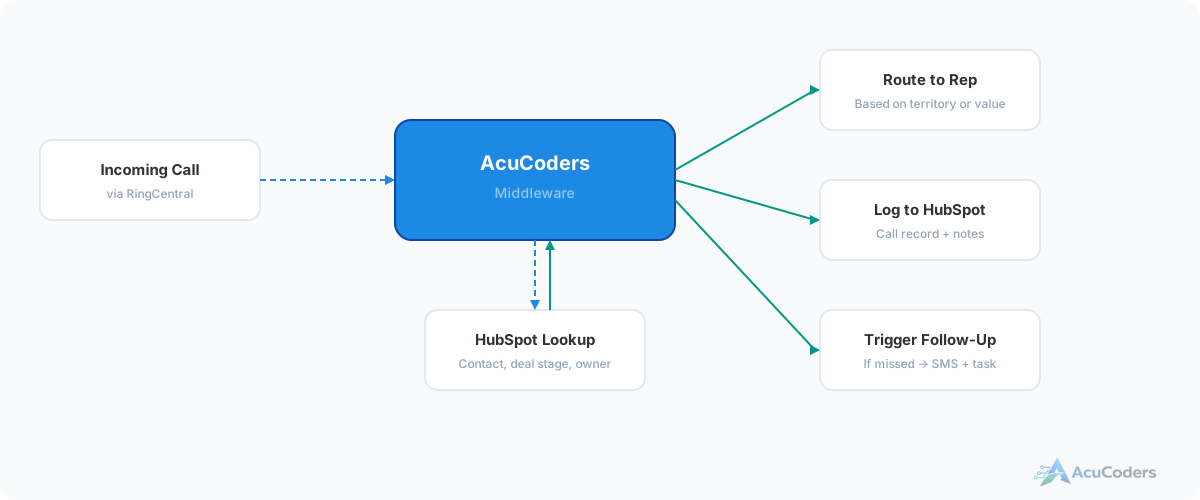
The Problem
The Native Integration Works — Until It Doesn't
RingCentral's built-in HubSpot integration logs calls. That's genuinely useful. If basic call logging is all you need, the native connector is fine and you should use it.
But most growing sales teams hit the wall fast. A missed call should trigger a follow-up — the native integration doesn't do that. Calls should route differently based on deal stage or contact owner — that's not built in either.
Voicemails sit as audio files nobody listens to. After-hours calls get the same treatment as business-hours calls. High-value prospects get no special handling. The native integration treats every call the same.
Where the native integration falls short:
No missed call automation. A missed call logs in HubSpot, but nothing happens. No SMS, no task, no notification to the assigned rep.
No conditional routing. Every call is treated the same regardless of deal value, contact owner, or time of day.
No voicemail transcription. Audio files are attached but not transcribed — you can't search or scan them quickly.
No custom logic. VIP callers, after-hours handling, spam filtering — none of it is configurable in the native app.
What Custom Integration Adds
Beyond What the Native Connector Can Do
Conditional Call Routing
Route calls based on HubSpot data — deal stage, lifecycle stage, contact owner, custom properties. High-value leads get priority handling.
Missed Call Automation
Missed a call? Trigger an immediate SMS, create a callback task, notify the rep via Slack, or enroll the contact in a follow-up sequence — all automatically.
Voicemail Transcription
Voicemails transcribed via AWS Transcribe and attached to the HubSpot contact record as searchable text. No more listening to audio files.
After-Hours Logic
Calls outside business hours handled differently — different voicemail routing, different follow-up timing, different notification rules.
VIP Caller Handling
Flag high-value contacts for priority treatment. Route to senior reps, skip IVR menus, trigger immediate Slack alerts.
Call Analytics in HubSpot
Track call volume, response times, missed call rates, and follow-up performance directly in HubSpot dashboards and reports.
How It Works
Four Steps to a Smarter Connection
Audit Your Current Setup
We look at your RingCentral configuration, HubSpot setup, and what the native integration is (or isn't) doing. We identify what's missing and what's possible.
Design the Logic
We map out the rules — what happens on inbound calls, missed calls, voicemails, after-hours, VIP contacts. Every scenario gets a defined workflow.
Build and Test
We connect RingCentral events to HubSpot via webhooks and APIs. Every call scenario is tested — inbound, outbound, missed, voicemail, unknown number, existing contact.
Go Live and Monitor
We deploy, monitor the first week of real calls, and adjust routing rules or automation logic based on actual usage patterns.
Doesn't RingCentral already integrate with HubSpot?
Yes — and if basic call logging is all you need, the native integration works fine. Custom integration adds conditional routing, missed call automation, voicemail transcription, and business-specific logic the native app can't handle.
What can a custom integration do that the native one can't?
Route calls based on HubSpot properties. Trigger follow-ups on missed calls. Transcribe voicemails. Handle after-hours differently. Escalate VIP callers. Anything that requires conditional logic.
Do we need to remove the native integration?
Not always. Sometimes we build alongside it. Sometimes replacing it is cleaner. We'll recommend the right approach for your situation.
How long does the project take?
Most RingCentral-HubSpot integrations are live within 2–4 weeks. Simple missed call automation can be faster. Complex multi-condition routing takes longer.
What if we switch phone systems later?
The HubSpot-side logic — routing rules, task creation, follow-up sequences — stays the same. Only the phone system connection changes.
Related Services
Explore More Integration Services
More in CRM Integration
Related CRM Integration Pages
Outgrown the Native Integration?
Tell us what's not working with your RingCentral-HubSpot setup. We'll show you what's possible.