
Xero + CRM Integration
Close a Deal. Invoice Creates
Itself in Xero.
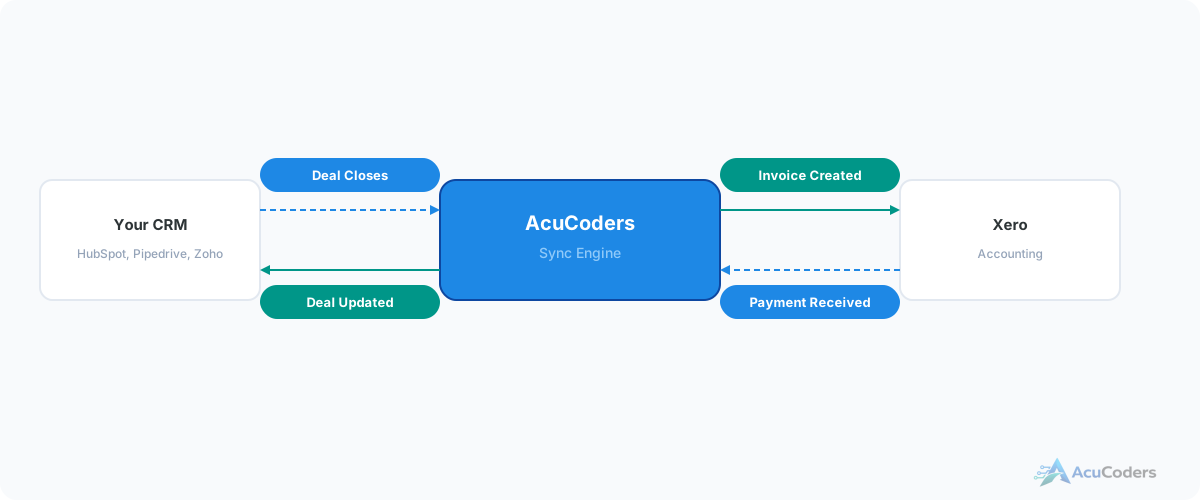
When a deal closes in your CRM, the invoice should appear in Xero automatically. When payment lands, the CRM should know. No double entry. No copy-paste. No lag.
25+ years building softwareAWS Certified Solutions Architect24/7 monitored infrastructure
The Problem
Manual Double Entry Between Sales and Accounting
A deal closes in the CRM. Someone walks over to Xero and recreates the invoice from scratch — same contact, same line items, same amounts. Typed in again by hand.
A payment comes in. Someone checks Xero, then goes back to the CRM to update the deal status. Sometimes they do it right away. Sometimes it's days later. Sometimes it doesn't happen at all.
New contacts get created in both systems independently. After a few months you have duplicates everywhere, mismatched data, and no single source of truth for customer information.
The cost of disconnected systems:
Double data entry. Every deal closed means retyping the same information into Xero. Every payment means updating the CRM manually.
Data mismatches. A contact's address updates in Xero but not the CRM. An invoice amount differs from the deal value. Nobody catches it for weeks.
Delayed invoicing. The gap between closing a deal and sending an invoice shouldn't exist — but it does when someone has to remember to do it manually.
No payment visibility in sales. Your sales team doesn't know which clients have paid and which haven't — because that information lives in Xero, not the CRM.
What Syncs
Data That Flows Automatically
Deals to Invoices
A deal moves to "Closed Won" in your CRM and an invoice is created in Xero — correct contact, line items, amounts, tax codes, and payment terms.
Payments to Deal Status
A payment is recorded in Xero and the associated deal in your CRM updates automatically — paid, partially paid, or overdue.
Contact Sync
Contacts created or updated in either system sync to the other. No duplicates. One source of truth for name, email, address, and phone.
Line Items
Products and services from CRM deals map to Xero invoice line items. Quantities, unit prices, and descriptions carry over correctly.
Payment Terms
Due dates, payment terms, and discount conditions from the CRM deal apply to the Xero invoice automatically. No manual adjustment needed.
Overdue Alerts
When an invoice goes overdue in Xero, the CRM deal gets flagged and the account owner gets notified. Sales knows when to follow up on payment.
Supported CRMs
CRMs We Connect to Xero
Common Pairings
- HubSpot + Xero — deals to invoices, contacts synced
- Pipedrive + Xero — pipeline to accounting, fully automated
- Zoho CRM + Xero — bidirectional sync
Also Supported
- Salesforce + Xero
- Industry-specific CRMs + Xero
- Any CRM with an API + Xero
Why Xero
A Modern API Without the Licensing Headache
We integrate with multiple accounting platforms, but Xero is our preference for new projects. The API is modern, well-documented, and doesn't charge steep developer licensing fees.
Some alternatives charge significant per-connection API fees that get passed on to clients. Xero doesn't. That means more budget goes toward building the integration logic you actually need, not toward platform access costs.
If you're already on another accounting platform, we can work with it. But if you're choosing, Xero is the more practical path for integration work.
Which CRMs do you connect to Xero?
HubSpot, Pipedrive, Zoho, Salesforce, and any CRM with an API. Pipedrive and HubSpot are our most common Xero pairings.
What data syncs between Xero and the CRM?
Closed deals create invoices. Payments update deal status. Contacts sync bidirectionally. Line items, tax codes, and payment terms all map across.
Why Xero instead of QuickBooks?
Xero's API is modern and doesn't charge steep developer fees. We can work with QuickBooks if that's what you're on, but Xero is the more practical integration target for new projects.
Can you handle complex invoicing rules?
Yes. Multi-line invoices, percentage discounts, regional tax codes, recurring invoices, partial payments — the integration handles whatever your invoicing rules require.
What about existing contacts in both systems?
We run a deduplication and matching process during setup. Existing contacts are linked so future syncs update the right records without creating duplicates.
Related Services
Explore More Integration Services
Setup guides
Doing some of this yourself?
Xero API Setup for Integrations
Step-by-step instructions for creating a Xero developer app, configuring OAuth 2.0, copying credentials, and authorizing integration access.
Read guide XeroXero Chart of Accounts Preparation
Setting up your chart of accounts for integration — which accounts map to which data.
Read guideMore in CRM Integration
Related CRM Integration Pages
Stop Typing Invoices Twice
Tell us what CRM and accounting setup you're running. We'll show you how to connect them.